
The app takes documents from a local folder, turns them into text, chunks the text, creates embeddings through LM Studio, stores a simple NumPy vector index, retrieves matching chunks for a question, and then asks a local chat model to answer with citations.
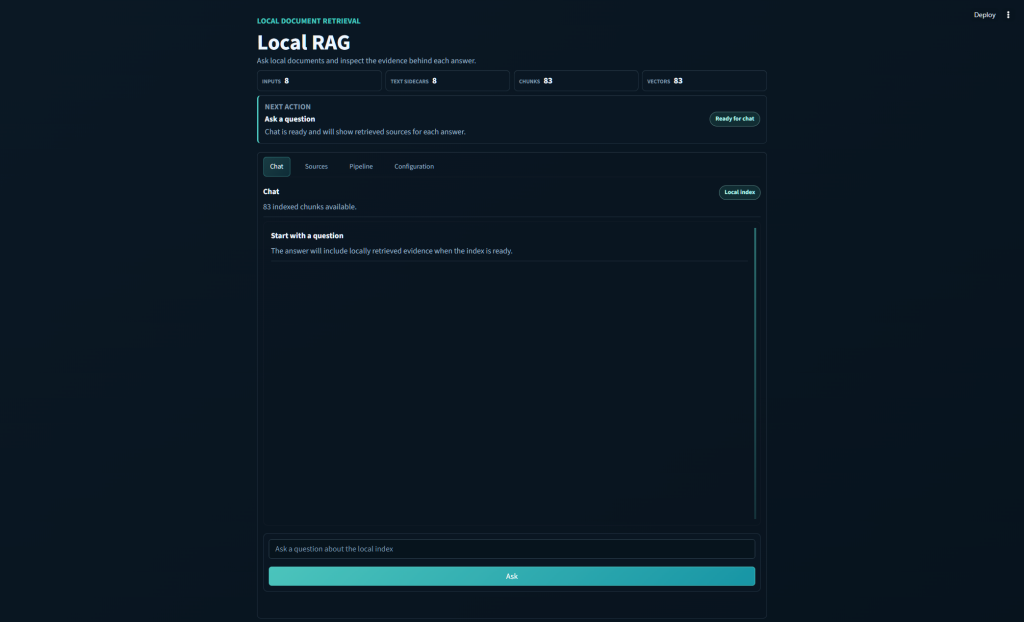
I am once again linking this in with something actually beneficial to me rather than a vague aimless project. I’m feeding in my notes from my Japanese lessons, alongside other study materials too.
The basic loop is straightforward:
- Put documents into an input folder (
/Inputs) - Extract or OCR them into text files.
- Split the text into chunks → Embed those chunks.
- Ask a question.
- See response (with citations)
The answer is not just a chat response floating in space. The app keeps track of which chunks were used, including the source file, page number, chunk number, and similarity score. That makes it much easier to tell whether the model is actually answering from the material or just sounding confident whilst outputting nonsense.
What Tech?
I wanted this project to be a learning tool as much as an app. A lot of RAG examples work, but they can make the process feel more mysterious than it needs to be. I wanted each stage to be something I could run, inspect, break, and fix.
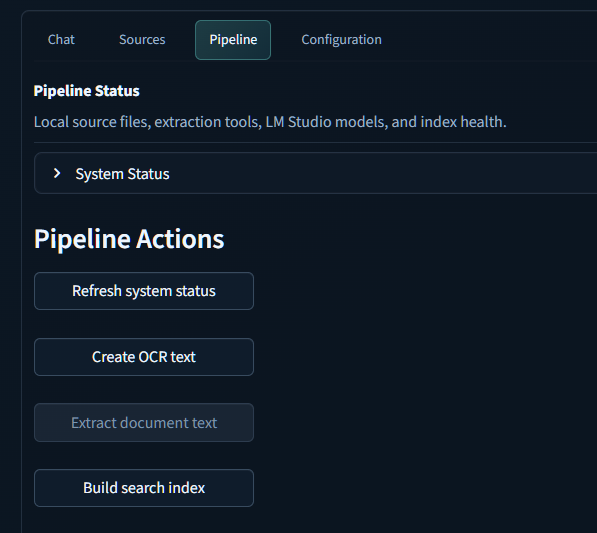
The Streamlit interface has tabs for chat, source inspection, pipeline actions, and configuration. I can check whether LM Studio is running, whether the embedding and chat models are loaded, whether OCR tools are available, and whether the index is ready.
For me, that status view matters. Local AI projects often fail because one quiet dependency is missing. Tesseract is not on the path. Ghostscript is missing. The embedding model is installed but not loaded. The index has not been built yet. A good status page saves a lot of guessing.
Input
The app reads source files from a local Inputs folder. It supports PDFs, plain text, Markdown, reStructuredText, CSV, Word documents, Excel workbooks, and PowerPoint decks.
PDFs necessarily get some special handling because some PDFs already have text, while others are just scanned page images. For scanned PDFs, the app uses OCRmyPDF, Tesseract, and Ghostscript. The default OCR languages are English and Japanese.
For non-PDF documents, the app extracts text directly, supporting: .txt .md .rst .csv .docx .xlsx and .pptx file types.
Chunking and Embeddings
Once the app has text, it splits it into chunks. Each chunk gets metadata:
- source
- page
- chunk_index
- text
Then the app sends the chunk text to LM Studio’s OpenAI-compatible API to create embeddings. The resulting vectors are normalized and stored locally in a compressed NumPy file, and the the readable chunk metadata is stored alongside.
Asking Questions
When I ask a question, the app embeds the question using the same embedding model, compares it against the stored chunk vectors, and pulls back the most similar chunks. The default is the top five.
Those chunks are then placed into a prompt that tells the chat model to answer only from the provided context and to cite the sources using labels like [S1].
The system prompt is intentionally strict:
Answer only from the provided context. If the context does not contain enough information, say that you do not know from the provided context.
That does not make hallucination impossible, but it does make the desired behavior clear. More importantly, the UI exposes the retrieved chunks, so I can see what the model was actually given.
The Streamlit Interface
The browser app has four main tabs:
Chat
Question-and-answer view.
Sources
Shows the retrieved chunks for the latest answer, including source labels, page numbers, chunk numbers, scores, and previews.
Pipeline
Has buttons for the setup work: refresh status, create OCR text, extract document text, and build the search index.
Configuration
To tune retrieval, OCR, and ingest settings without editing code.
I had Codex output a visual style guide file from my other projects, and then requested it to apply it to this app. It did a pretty good job of it, but definitely needed some iterative improvements to be made.